
MSL Setup v1.2.0 – From Proxmox VLAN Chaos to Fully-Automated Pritunl Labs
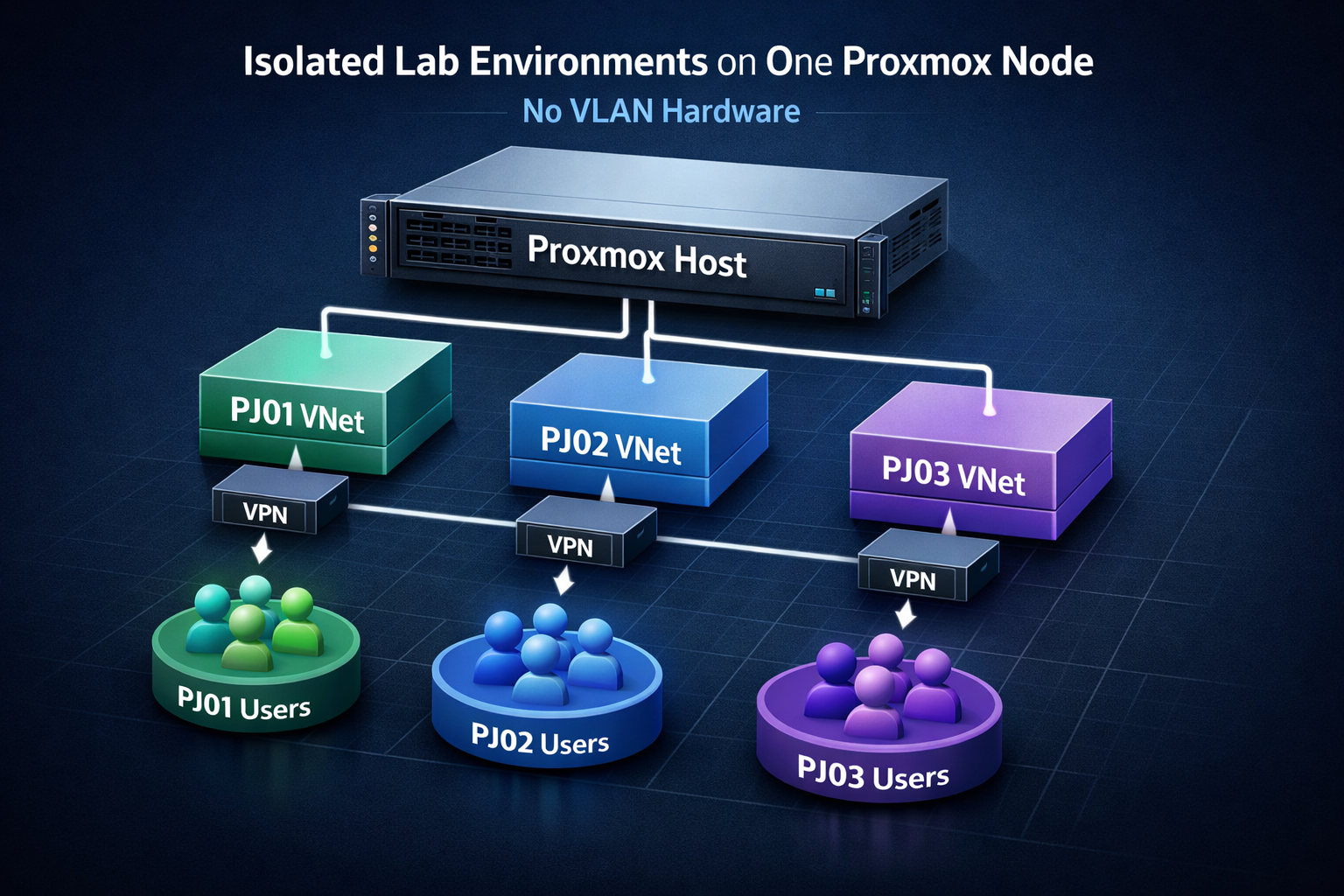
Guide/Pattern: multi-tenant style isolated labs on one Proxmox node (no VLAN hardware)
🎉 Stop fighting Proxmox VLANs. MSL Setup v1.2.0 just went full auto for Pritunl.
Hey folks,
Remember that post about squeezing multi-tenant style labs out of a single Proxmox node without turning your life into VLAN-debugging hell?
The one that unexpectedly picked up 340+ upvotes and a ton of “I need this yesterday” comments?
That idea has been quietly growing into a real product.
Today, I’m flipping two big switches at once:
1. Zelogx™ Multiverse Secure Lab Setup (MSL Setup) is now FREE for personal use.
2. v1.2.0 ships with full, zero-touch Pritunl provisioning.
From bare-metal Proxmox → SDN → Pritunl Orgs/Servers/bring-up…
The whole path is now automated.
What MSL Setup actually does (in one sentence)
It turns a single Proxmox host into a multi-tenant, L2-isolated lab box with repeatable project environments (PJ01–PJ08 style) — no VLAN hardware required.
Each project lab gets its own:
- Isolated SDN Simple Zone + VNet
- Dedicated Pritunl VPN entry point (users only see their project)
- Clean, per-project IN/OUT firewall policy based on security groups
Target use cases:
- Freelancers juggling multiple client projects on one Proxmox box
- Small shops who are done with “one big flat dev LAN”
- Homelabbers who want something closer to a real isolation pattern, not just “hope and DHCP”
The pain this is meant to kill
Most Proxmox labs start as:
one node + one LAN + “we’ll be careful”
That works… until:
- You run multiple client projects in parallel
- You let external / offshore members VPN into the lab
- Someone “just for a quick test” bridges a VM into the wrong network and nukes connectivity
I wanted a pattern where:
- Each project lives in its own SDN Simple Zone + VNet
- VPN users can only reach their project lab
- Spinning up a new project feels like instantiating a template, not hand-crafting another snowflake
MSL Setup treats your lab as infrastructure with a design, not as a pile of “one more tweak” changes.
What’s new in v1.2.0?
The “zero-touch Pritunl” release
v1.2.0 is where Pritunl finally joins the “no more manual clicks” club.
Key changes:
- Core Pritunl handling is now implemented as Python-based binaries
– more robust API calls, better error handling, less shell acrobatics - After the Pritunl VM is deployed, MSL Setup will now automatically:
- Create the Organization
- Create the Server
- Attach the Org to the Server
- Start all project VPN Servers
- Cleaned up an outdated interactive prompt that could break the flow post-deploy
Net result:
From “fresh Pritunl VM” to “all project VPN entry points are up and mapped to the right SDN zones”
is now one automation run, not a series of WebUI rituals.
Why the personal tier is now free
This pattern only really works if more people actually use it:
- Freelancers who want to stop burning time on DIY network isolation
- Small shops who need something better than “flat dev LAN + one VPN”
- Homelab/education setups that want to teach real isolation and RBAC, not just “everything can ping everything”
So for non-commercial, personal use:
MSL Setup is free.
The goal is simple: kill “snowflake labs” as the default.
If you like it and want to use it in a business context, there’s a commercial path.
But if you’re just trying to make your Proxmox lab less terrifying, the entry cost is now basically: “one Saturday afternoon and a coffee.”
Who this is for (and not for)
Great fit if you:
- Own or rent exactly one Proxmox node and want per-project isolation
- Need to invite clients / partners / offshore devs into only their corner of the lab
- Want something repeatable: PJ01, PJ02, PJ03… same pattern, zero drama
Probably not needed if you:
- Already have a full-blown SDN fabric + hardware firewalls + change boards
- Love writing VLAN configs at 2am and consider it a personality trait
Quick start
Personal / community edition lives here:
- GitHub – MSL Setup
https://github.com/zelogx/msl-setup
If you’re:
- Tired of hand-crafting SDN Simple Zones
- Worried about VPN leakage between projects
- Or just want your Proxmox lab to look like a grown-up multi-tenant platform
…then spin up a spare node, give MSL Setup v1.2.0 a run, and see how it feels.
Questions, war stories, “this saved my weekend”,
or “you’re overengineering this and here’s my simpler pattern” — all very welcome.